
Month-End Close Software for Accounting Firms
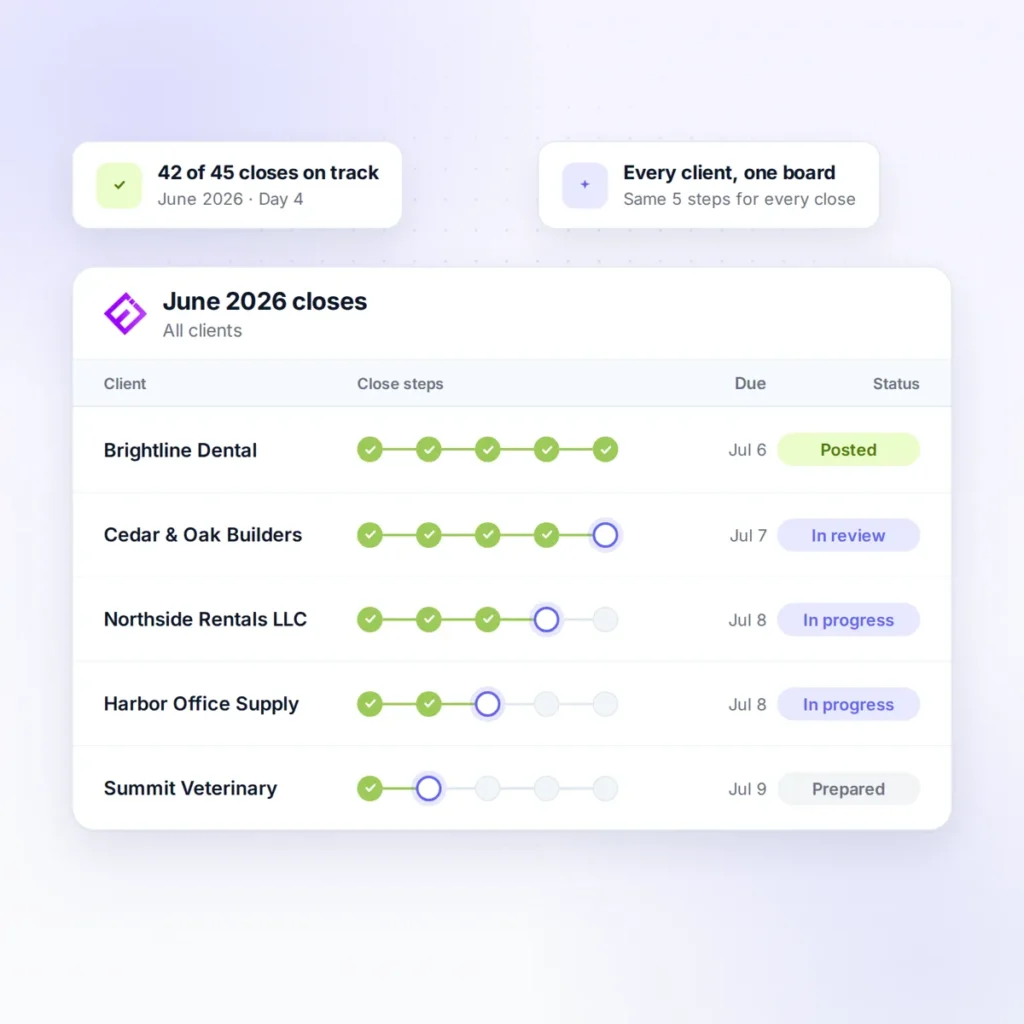
Month-end close software for accounting firms has to handle dozens or hundreds of closes a month, not the one set of books an in-house controller closes. Ensi does most of that close work on QuickBooks Online, and your team reviews and posts it.
Definition
What is month-end close software?
Month-end close software helps accountants finalize a period’s books. That covers categorizing transactions, reconciling accounts, recording accruals and adjustments, reviewing ledgers for errors, and analyzing changes from prior periods.
For an accounting firm, it should:
- Do the close work, not just track it.
- Run across every client ledger, not one company’s books.
- Surface exceptions, so reviewers start where the problems are.
- Keep a human review before anything posts.
- Work inside your existing ledger, with no migration.
- Easy to try, no long-term contract.
The challenge
Why is the month-end close harder for accounting firms?
Every client is its own close, and the problems grow with the client list.
Volume
Most clients close in the same few days, so the work arrives all at once.
Inconsistent client data
Late statements, uncategorized transactions, and missing documents look different for every client.
Limited review time
Partners and managers can't review every ledger in depth, so quality depends on spot-checks.
Staffing
Each new client adds close hours to a team that is already stretched.
How it works
How does a close run in Ensi?
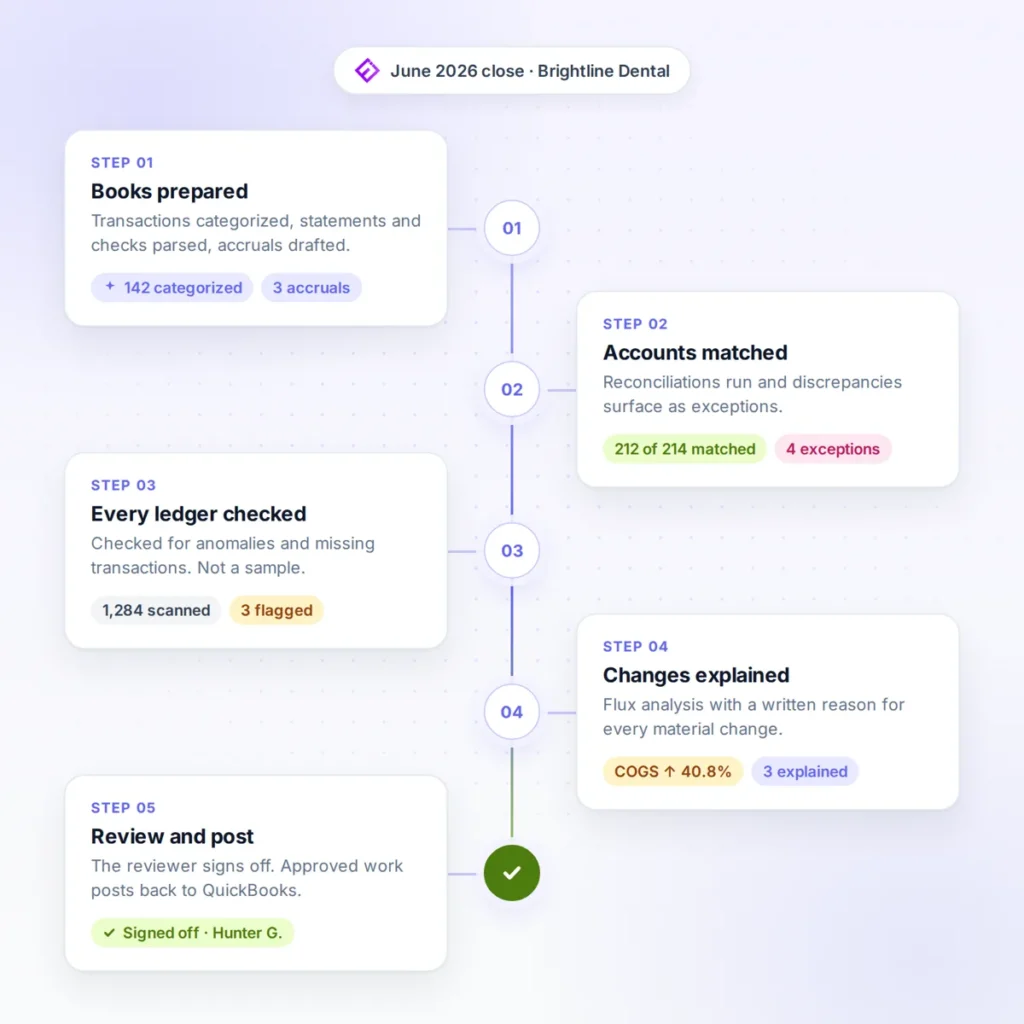
Ensi brings AI month-end close automation to each step, and your team reviews the result.
Books prepared
Transactions are categorized, statements and checks parsed, and accruals prepared, so the ledger is ready to close. See how AI bookkeeping for accounting firms handles that daily work.
Accounts matched, exceptions flagged
Ensi runs reconciliations and surfaces discrepancies. Your team starts from the exceptions instead of from scratch.
Every ledger checked
Every client ledger is checked for anomalies and missing transactions each month, not a sample.
Changes explained
Ensi runs flux analysis against prior periods and writes up what changed and why. Your reviewers get a head start on variance explanation, and your clients get answers, not just numbers.
Review and post
Your team approves or adjusts the work. Approved entries post back to QuickBooks Online, which stays the system of record.
Review
How does review stay consistent across your team?
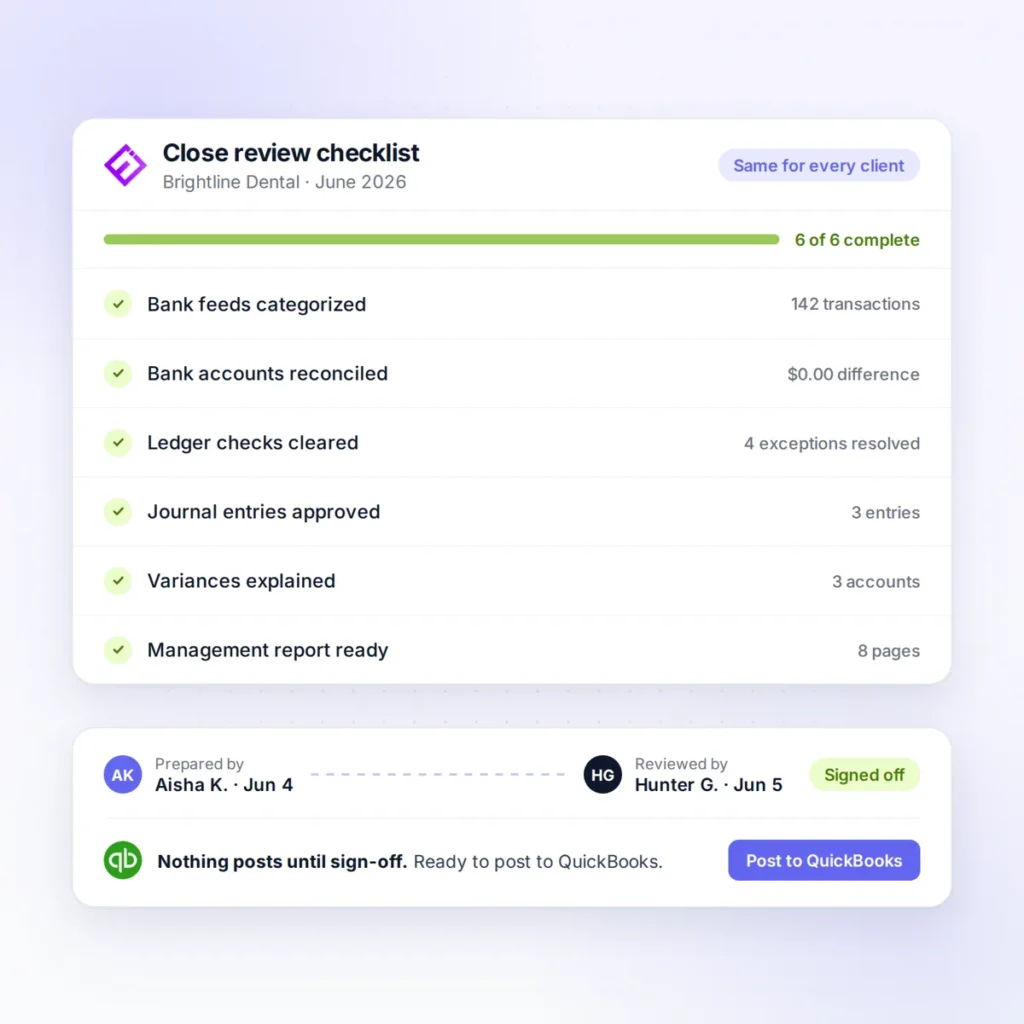
Every close goes through the same review, whoever prepared it.
One checklist for every client
Review is standardized with checklists, so the same points get checked on every client file.
Exceptions first
Exception lists and suggested corrections let staff clear most issues before manager or partner sign-off.
Audit trail
Adjustments carry an audit trail, so whoever signs off can trace what changed.
Nothing posts without approval
Ensi suggests, and your team approves or overrides. Nothing reaches a client's books until your team signs off.
Comparison
Does your close software do the work, or just track it?
Most close tools organize the work. Ensi prepares it, and your team reviews it.
- Built for: Any team
- Ledger: Any
- Who prepares the work: Your staff, by hand
- Review before posting: Manual
- Built for: Internal finance teams on an ERP
- Ledger: ERP
- Who prepares the work: Varies by tool
- Review before posting: Varies by tool
- Built for: Accounting firms closing many client books
- Ledger: QuickBooks Online
- Who prepares the work: Ensi prepares, your staff review
- Review before posting: Every entry approved, every ledger checked
For the full set of firm workflows Ensi covers, see what Ensi does for CPA and bookkeeping firms.
Results
What changes for your firm and your clients?
A shorter close frees time at every level of the firm.
For your firm
Close times drop by over 50%, and firms get 2X to 3X the throughput from the same team. That makes room for more clients without hiring ahead of revenue.
For your team
Less repetitive reconciliation and data entry leaves more time for analysis, the work accountants trained for.
For your clients
Financials arrive sooner. With the prep handled, your firm can offer weekly cash reports and plain explanations of what changed.
FAQ
Frequently asked questions about month-end close software
What is the best month-end close software for accounting firms?
The one that does the close work across every client ledger and keeps your accountants in control of what posts. Ensi is built for CPA and bookkeeping firms on QuickBooks Online, and covers both the close and the daily bookkeeping that feeds it.
How much faster can a firm close with Ensi?
Close times are reduced by over 50%. Results depend on each client’s complexity and data quality.
Will it create more review work if the AI gets something wrong?
Review starts from exception lists with suggested corrections, so effort goes to the items Ensi flags, not to re-preparing the whole close. Corrections are made during review, before anything posts to the client’s books.
Does Ensi replace QuickBooks Online?
No. Ensi works on top of QuickBooks Online, which stays your system of record, so your client files stay where they are. Its founders come from data security, its SOC 2 audit is underway, and you can cut access to any client’s data in one click.
Can I try Ensi without a long-term commitment?
Yes. Ensi is month to month, with no minimums and no contract. Firms connect QuickBooks Online and are live in under 30 minutes, with no migration.
How do you run a month-end close across many clients?
Standardize the review, start every close from exceptions, and check every ledger rather than a sample. Some firms also spread the work across the month: read why small CPA firms are switching to a continuous close.
Live demo
Watch Ensi close one of your client files
Pick a client file, ideally one with recurring transactions, high volume, or complex rules, such as an ecommerce, multi-location, or multi-entity business. In a 30-minute demo, we run its close live, with no slides.
Month to month, with no contract. Disconnect in one click.