
AI Bookkeeping for Accounting Firms
AI bookkeeping fixes the problem most accounting firms actually have: not demand, but capacity. Ensi prepares the routine bookkeeping on top of QuickBooks Online, and your team reviews and posts it. The same team carries more client books.

Works with QuickBooks Online
80%+
of bank feed transactions categorized automatically
2X to 3X
team throughput
50%+
shorter close times
Definition
What is AI bookkeeping for accounting firms?
AI bookkeeping for accounting firms is software that does routine bookkeeping across many client ledgers. It categorizes transactions, prepares journal entries and accruals, extracts data from bank statements and checks, and flags anomalies. Accountants review and approve the work before it posts.
Most AI bookkeeping tools and apps are built for one company’s books. Firm-grade AI-assisted bookkeeping is built for the practice:
- It works across dozens or hundreds of ledgers.
- It learns from each client’s own history.
- It keeps a professional reviewer in control of every entry.
Coverage
What does AI bookkeeping cover?
It covers the high-volume, low-judgment work in every client file. Ensi prepares it, and your team makes the calls.
| Task | What Ensi does | What your team does |
|---|---|---|
| Transaction categorization | Categorizes 80%+ of transactions automatically, learning from each client’s past categorizations. No bank rules to build or maintain. | Reviews categorizations and resolves flagged items |
| Accruals and journal entries | Prepares recurring accruals, deferrals, and adjusting entries, so nothing slips at period end | Approves or adjusts each entry before it posts |
| Bank statements and check images | Extracts the data, with no manual keying | Checks the extracted entries |
| Ledger checks | Checks every ledger for anomalies and missing transactions, not a sample | Investigates the exceptions |
Reconciliations, flux analysis, and close review run on the same platform. See what Ensi does for CPA and bookkeeping firms.
How it works
How does AI bookkeeping work with Ensi?
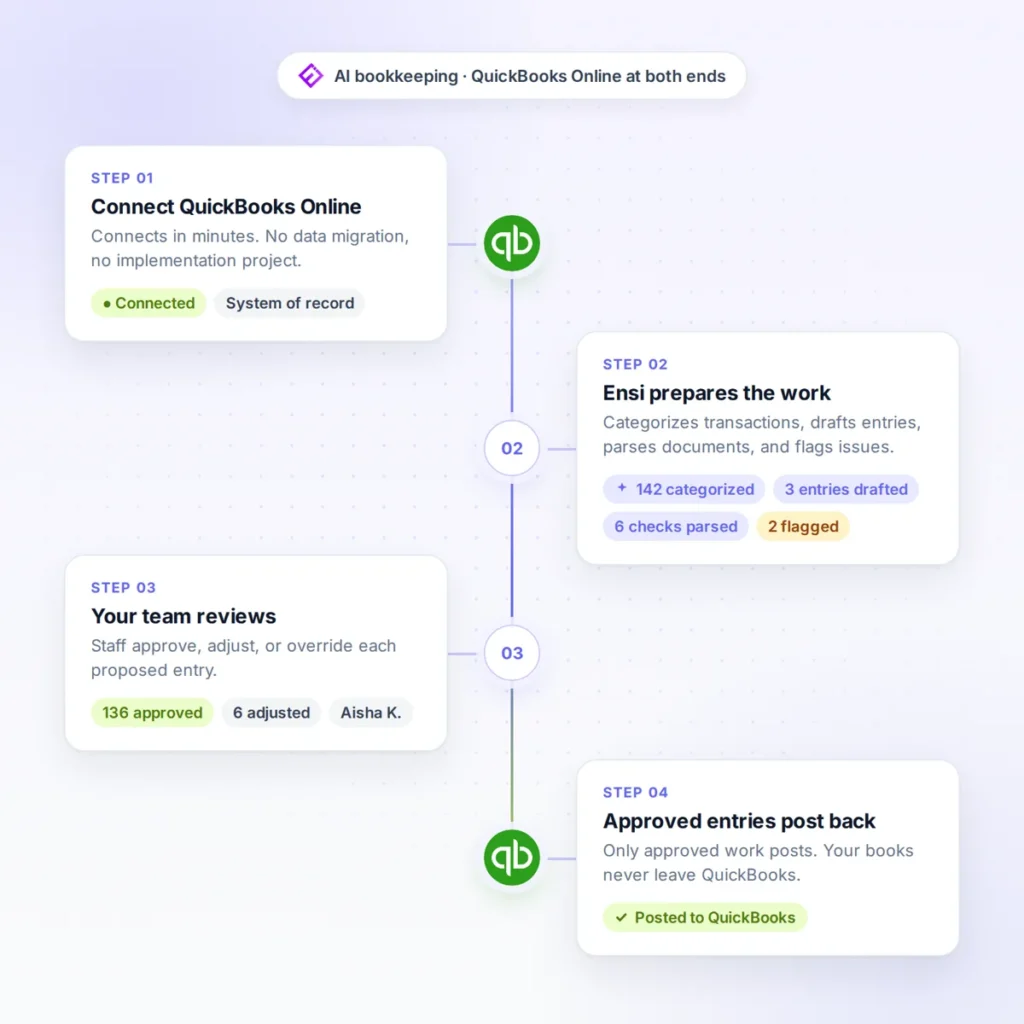
Four steps, with QuickBooks Online at both ends.
Connect QuickBooks Online
Ensi connects in minutes, with no data migration and no implementation project.
Ensi prepares the work
It categorizes transactions, prepares entries, parses documents, and flags issues across your client ledgers.
Your team reviews
Staff approve, adjust, or override each proposed entry.
Approved entries post back to QBO
QuickBooks stays your system of record. Your clients' books never live anywhere else.
Control
What stays under your firm's control?
Every posting decision. Ensi is built as a human-in-the-loop system: it suggests, your team approves or overrides, and nothing posts to a client’s books without approval. Your name is on the work, and your clients rely on your judgment.
Flags, not guesses
When Ensi is unsure about an item, it flags it for your team instead of guessing.
Standardized review
Checklists, exception lists, and suggested corrections let staff clear most issues before manager or partner sign-off.
Audit trail
Adjustments keep their history, so a reviewer can see what changed.
Rules vs. AI
How is this different from rules-based automation?
Rules only do what someone wrote, client by client. Ensi learns from each client’s history instead, so there is nothing to maintain.
- Setup: Rules built for each client
- Maintenance: Rules break and need updates
- Quality control: Errors outside the rules go unnoticed
- Adding a client: Means writing a new rule set
- Setup: Connect QBO in minutes
- Maintenance: No rules to maintain
- Quality control: Every ledger checked, every entry reviewed
- Adding a client: Means connecting its QBO file
Some AI bookkeeping platforms replace your ledger. Ensi sits on top of QuickBooks Online, so there is no migration and QBO stays the system of record. For the broader picture, read automation vs AI in accounting.
Firm impact
What changes for your firm?
Three things: capacity, close time, and what you deliver to clients.
More clients, same team
Firms using Ensi get 2X to 3X the throughput from their existing staff.
Books ready sooner
Month-end close times drop by over 50%, because preparation and ledger-wide checks are done before review starts.
More to offer clients
With the grunt work handled, your team can deliver weekly cash reports and plain explanations of what changed, not just a tidier version of last month’s books.
FAQ
Frequently asked questions about AI bookkeeping
Will AI bookkeeping replace my staff?
No. Ensi takes the repetitive work, and your staff review, investigate exceptions, and advise clients. Removing data entry lets your people do the analytical work they trained for, which helps retention.
What happens when the AI gets something wrong?
It never reaches a client’s books unreviewed. Your team adjusts or overrides the entry before it posts, inside the QBO process you already run. Review works from exception lists, so staff spend their time on flagged items, not on re-checking everything.
How accurate is AI bookkeeping?
Ensi learns from how your firm has categorized each client’s transactions, and it flags what it is unsure about instead of guessing. Your team approves every entry before it posts, so accuracy is checked on every item, not assumed.
Is client data secure?
Ensi’s founders come from data security, and its SOC 2 audit is underway. Client books stay in QuickBooks Online, and you can cut Ensi’s access to any client’s data in one click.
Can ChatGPT do my bookkeeping?
A general-purpose chatbot can help with questions, but firm bookkeeping needs a ledger connection, a review step, and a record of what changed. Ensi works on the client’s QBO file, and nothing posts without your team’s approval. See how Claude Cowork compares with Ensi for CPA firm workflows.
How long does it take to set up?
Most firms are live in under 30 minutes. You connect QuickBooks Online, with no migration or rebuild. Ensi works with QuickBooks Online only.
Live demo
See AI bookkeeping on your own client file
Bring a real client file to a 30-minute demo, and we’ll run Ensi on it live. No slides.
The best test is a client with recurring transactions, high volume, or complex rules, such as an ecommerce, multi-location, or multi-entity business.
Month to month, no contract, and it disconnects in one click.