
Flux Analysis Software for Accounting Firms
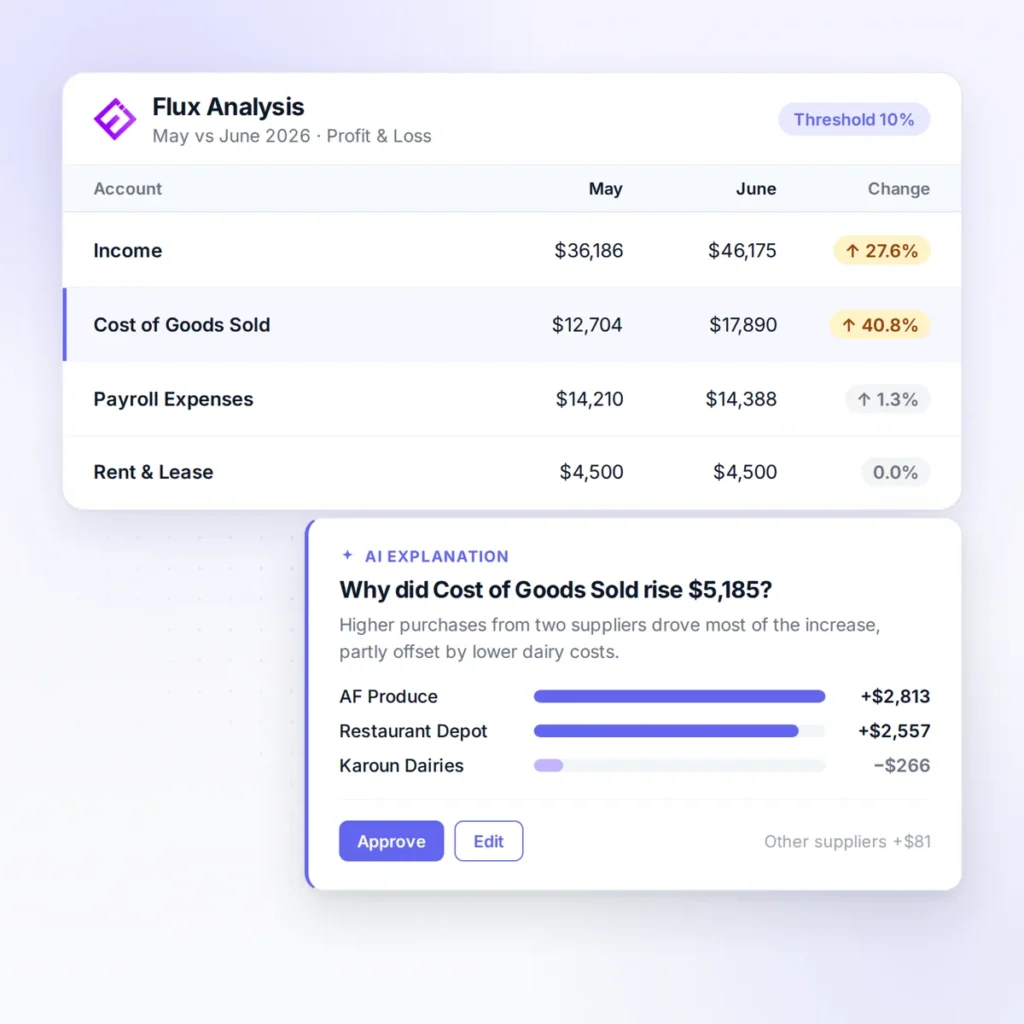
Ensi automates flux analysis for accounting firms on QuickBooks Online. It compares each period with prior periods and explains what changed and why, so your team starts with answers instead of a blank variance report.

Works with QuickBooks Online
Under 30 min
to connect QuickBooks Online and go live
12 to 4 days
month-end close
2X to 3X
team throughput
Definition
What Is Flux Analysis?
Flux analysis, also called variance or fluctuation analysis, compares account balances between periods, such as this month versus last month or the same month last year, to identify significant changes and explain their causes. Accountants use it to catch errors before financials go out and to explain results to clients.
The problem
Why Flux Analysis Gets Skipped
Every client asks some version of the same question at month-end: why did this number change? Answering it means comparing every account against prior periods, deciding which changes matter, and tracing each one back to the transactions behind it. Across a full client list, flux analysis is often the step that gets rushed or skipped.
It comes last
Flux review happens after categorization and reconciliations, when the deadline is closest.
Thresholds are judgment calls
Deciding which changes matter takes experience, and every client is different.
Explanations take digging
Each variance has to be traced back to the transactions that caused it.
Volume
Doing it properly for every client, every month, takes hours most firms don't have.
When it’s skipped, errors such as a duplicated bill or a miscategorized payment reach the client’s financials, and the firm loses a chance to show the client what’s happening in their business.
How it works
How Does Ensi Automate Flux Analysis?
Ensi runs flux analysis on every client ledger during the month-end close and hands your team written explanations to review.
Compares Every Account Against Prior Periods
Ensi reviews period-over-period changes across each client ledger, every month, not just for the clients someone has time for.
Explains What Changed and Why
Ensi doesn’t just flag a variance. It explains the change, so your team can confirm the story instead of building it from scratch.
Connects Variances to Ledger Problems
Some variances are real business changes. Others are errors. Ensi’s ledger checks for anomalies and missing transactions help separate the two.
Your Team Reviews Before Anything Goes to the Client
Accountants review Ensi’s explanations, adjust where needed, and decide what goes into the client’s month-end package.
Compare
Manual Flux Analysis vs. Spreadsheet Templates vs. Ensi
- Coverage: Clients someone has time for
- Finding variances: Eyeballing reports
- Explanations: Written by hand
- Catching errors: If noticed
- Maintenance: None, but slow
- Coverage: Clients someone exports
- Finding variances: Formulas flag thresholds
- Explanations: Written by hand
- Catching errors: If noticed
- Maintenance: Templates break as accounts change
- Coverage: Every client ledger, every month
- Finding variances: Automated across all accounts
- Explanations: Explanations prepared; team reviews
- Catching errors: Linked to ledger checks for anomalies and missing transactions
- Maintenance: No templates to maintain
For your clients
What Better Flux Analysis Gives Your Clients
Answers, not just numbers. Clients get an explanation of what changed and why, which is the advisory work they value.
Fewer surprises. Errors your team catches in review are fixed before financials go out, not after the client spots them.
A reason to pay more. Firms using Ensi can offer clear monthly explanations and weekly cash reports as part of their service.
What to look for
Features to Look For in Flux Analysis Software
across every account
of significant changes
so reviewers can verify quickly
that catch errors behind variances
from one workflow
before anything reaches the client
FAQ
Frequently Asked Questions
What is flux analysis in accounting?
Flux analysis compares account balances between periods to identify and explain significant changes. It helps accountants catch errors and explain results before financial statements go to clients.
What's the difference between flux analysis and variance analysis?
The terms are often used interchangeably. Variance analysis sometimes refers specifically to actual versus budget, while flux analysis usually compares actual results across periods.
What is a good threshold for flux analysis?
Firms often combine a percentage threshold with a dollar threshold so small accounts don’t trigger noise. The right levels depend on the client’s size and materiality. Ensi helps by surfacing and explaining significant changes for review.
Can AI do flux analysis?
Yes. AI can compare periods across every account and draft explanations for what changed. An accountant should review the explanations before they reach the client.
Will reviewing Ensi's explanations add work for my team?
Review follows a standard checklist, with exception lists and suggested corrections, so staff clear most issues before manager or partner sign-off. When Ensi is unsure about an item, it flags it for your team instead of guessing.
Does Ensi work with QuickBooks Online?
Yes. Ensi reads from QuickBooks Online, your team reviews the proposed work, and approved entries post back to QBO. QuickBooks stays the system of record.
How long does it take to get started?
Most firms are live in under 30 minutes. You connect QuickBooks Online, with no migration or rebuild. Pricing is month to month with no minimums or contracts.
Is client data secure with Ensi?
Ensi’s founders come from data-security backgrounds, and its SOC 2 audit is underway. Client books stay in QuickBooks Online, and you can revoke Ensi’s access to any client with one click.
Get started
See Ensi Explain a Real Client's Month
Bring a client file to a 30-minute demo and watch Ensi run flux analysis live, with no slides.