
The Botkeeper Alternative for Accounting Firms
Botkeeper’s February 2026 shutdown pushed firms to rethink depending on one vendor. Whether you left or are weighing its new owner, the right Botkeeper alternative adds capacity without that risk. Ensi automates bookkeeping and month-end close inside QuickBooks Online, where your books stay. Your team approves every entry. No lock-in.

Works with QuickBooks Online
80%+
of bank feed transactions categorized automatically
Under 30 min
to connect QuickBooks Online and go live
12 to 4 days
month-end close
Timeline
Where Does Botkeeper Stand in 2026?
Botkeeper, an automated bookkeeping provider for accounting firms founded in 2015, announced in February 2026 that it was shutting down after raising nearly $90 million. Its CEO cited industry consolidation in late 2025 that hit its largest clients. Weeks later, Xendoo acquired Botkeeper’s Infinite platform and said it would remain active and supported.
The timeline:
2015
Botkeeper is founded to automate bookkeeping for accounting firms.
April 2024
Botkeeper launches Infinite, its AI platform for firms, with tech-only and service-assisted options.
Late 2025
Consolidation in the accounting industry hits several of Botkeeper’s largest firm clients.
February 2026
Botkeeper announces an orderly wind-down after acquisition, lender and bridge-capital talks fail.
Late February to March 2026
Xendoo, a bookkeeping services provider for small businesses, acquires the Infinite platform.
Read more
It said the platform remains fully operational, and that the two businesses would continue to operate separately.
For more background, read What Happened to Botkeeper.
Impact
What the Botkeeper Shutdown Means for Your Firm
Four things changed for firms that relied on Botkeeper.
For firms that moved off the platform, the work Botkeeper handled landed back on their teams, often in the middle of a close.
Processes, handoffs and review steps were built around Botkeeper. Whether you stay or switch, they need a fresh look.
Clients expect their books on time, whatever happens to your vendors.
Botkeeper’s CEO tied the shutdown to industry consolidation that hit its largest clients. Any vendor can change owners, strategy or pricing. What matters is how exposed your firm is when one does, and that starts with where your books live.
Your options
Should You Stay on Botkeeper Under Xendoo?
If your firm still uses Botkeeper Infinite, staying may be reasonable, and Xendoo has said the platform remains supported. Before you commit, get clear answers to these questions:
- What is the product roadmap and support model under new ownership?
- Have pricing or contract terms changed, and what notice will you get of future changes?
- Can you export all of your data, including transaction, categorization, reconciliation and close history, at any time?
- Where does each client’s general ledger live, and who owns it?
- How will the platform fit alongside Xendoo’s own bookkeeping services for small businesses?
If the answers leave you uneasy, it’s a good moment to compare alternatives while you still have time to plan the switch.
Checklist
What to Look For in a Botkeeper Replacement
Your Books Stay in Your Ledger
If the vendor changes or disappears, nothing is stranded.
Software Does the Prep Work
Automation that scales with your client list, not with someone else’s headcount.
Your Team Approves Every Entry
Nothing posts without an accountant’s sign-off.
Uncertain Items Are Flagged for Your Review
You decide anything the AI isn’t sure about.
It Covers the Close, Not Just Categorization
Reconciliations, ledger checks and variance explanations included.
Fast to Start
No migration or implementation project while you’re already behind.
Easy to Leave
Month-to-month terms and one-click disconnection, so you’re not locked in.
Comparison
Your Options After Botkeeper
- Who does the work: New staff
- Where the books live: Your QBO
- Review before posting: Your process
- Main trade-off: Slow and costly to hire and train
- Who does the work: The provider's team
- Where the books live: Your QBO, worked by the provider
- Review before posting: The provider's process
- Main trade-off: Depends on one outside team
- Who does the work: Infinite's automation, plus optional services
- Where the books live: Confirm with Xendoo
- Review before posting: Confirm with Xendoo
- Main trade-off: New owner since 2026; confirm roadmap, support and export terms
- Who does the work: AI inside the ledger
- Where the books live: QBO
- Review before posting: Varies; review recommended
- Main trade-off: Designed around one company's books
- Who does the work: AI prepares; your team reviews
- Where the books live: QBO, the system of record
- Review before posting: Every entry approved by your team
- Main trade-off: QuickBooks Online firms only
A note on built-in AI: any AI that works inside the system of record raises a concern worth weighing. AI can be confidently wrong, and one bad match can repeat across many transactions. Whichever AI you lean on, review its changes before each close. For a wider comparison, see our guide to the best AI accounting software.
Why Ensi
Why Firms Replace Botkeeper with Ensi
Software Does the Prep Work
Ensi categorizes 80%+ of transactions automatically, parses bank statements and check images, assists with accruals, runs reconciliations, checks every ledger and explains period-over-period changes. With Ensi, the same team gets two to three times the throughput. See AI bookkeeping for accounting firms, or browse every Ensi use case.
Your Books Never Leave QuickBooks Online
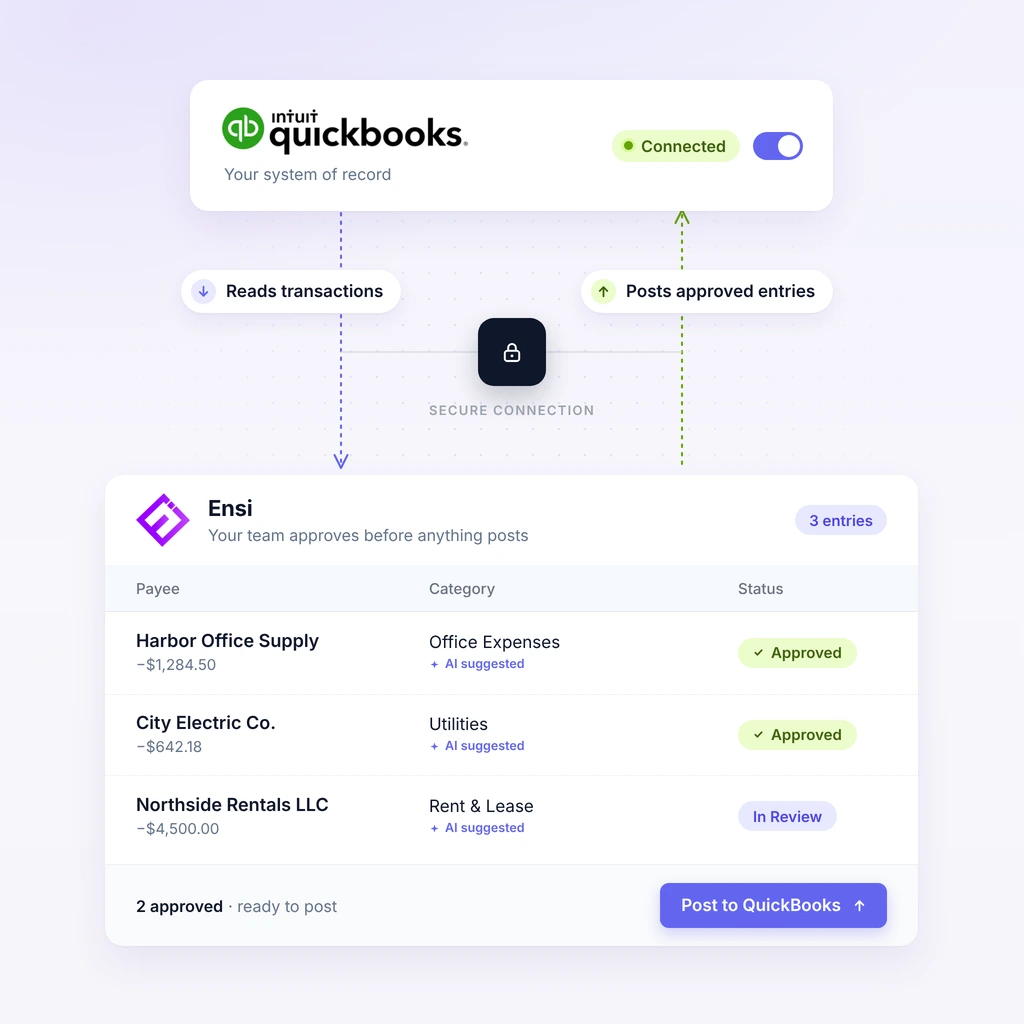
Ensi works on top of QuickBooks Online. Approved entries post back to QBO, which stays the system of record, so a change of vendor doesn't trap your clients' books.
Your Team Approves Every Entry
Ensi prepares and your team decides. Uncertain items are flagged for your review, nothing posts without approval, and every adjustment keeps an audit trail. Review runs on checklists and exception lists, so staff clear most issues before manager or partner sign-off.
Easy to Start, Easy to Leave
Most firms are live in under 30 minutes, with no migration or implementation project. Pricing is month to month with no minimums or contracts, and you can disconnect any client with one click.
Switching
How to Switch from Botkeeper to Ensi
Six steps take you from Botkeeper to Ensi.
Export Your Botkeeper Data
Download transaction and categorization history, reconciliation records, close tracking and reports for every client, and store them outside the platform. Don’t assume access will last indefinitely.
Confirm Each Client's Ledger
Make sure every client’s QuickBooks Online file is current and owned or accessible by your firm.
Connect QuickBooks Online
Ensi connects in minutes and learns from each client’s existing categorization history.
Start with Three Clients
Pick one simple, one average and one messy client, and run a month your team has already closed to compare results.
Roll Out and Set Review Owners
Add clients in batches and decide who reviews and approves Ensi’s work for each one.
Track the Results
Watch close time, review time per client and corrections found at close. See month-end close software for accounting firms.
FAQ
Frequently Asked Questions
Can we still use Botkeeper Infinite?
The Infinite platform is now owned by Xendoo, which has said it remains fully operational (as of March 2026). Firms still using it should confirm support, pricing and data-export terms directly with Xendoo.
What is the best Botkeeper alternative for accounting firms?
The best Botkeeper alternative keeps client books in a ledger your firm controls, uses software to do the prep work, and keeps accountants in control of what posts. For firms on QuickBooks Online, Ensi automates bookkeeping and month-end close while QBO stays the system of record.
Is Ensi a bookkeeping service?
No. Ensi is software. It does the bookkeeping and close prep work inside QuickBooks Online, and your own team reviews and approves it. Your firm keeps the client relationship and control of the books.
Can we switch to Ensi without changing QuickBooks?
Yes. Ensi works on top of QuickBooks Online, so there’s no migration. It learns from each client’s existing history in QBO.
How quickly can we replace Botkeeper with Ensi?
Most firms are live in under 30 minutes: you connect QuickBooks Online, with no migration. You can start with a few clients, then roll out across the rest of your list.
What happens to our books if we stop using Ensi?
Nothing changes in your books. They stay in QuickBooks Online the whole time. Ensi is month to month with no contract, and you can disconnect any client with one click.
Live demo
Replace Botkeeper Without Rebuilding Your Workflow
Bring a former Botkeeper client file to a 30-minute demo and we’ll run it live, with no slides.
Month to month, no contract, and you can disconnect in one click.