

Since mid-2025, QuickBooks Online has been adding AI agents that categorize transactions, help with reconciliations, chase invoices and answer questions about the business. For accountants, that raises practical questions: what do the agents actually do, what should you still review, and where does a firm-focused tool fit?
This guide covers what accountants need to know about AI in QuickBooks Online, and how Ensi works alongside it for firms that manage many QBO clients.
What Are QuickBooks Online’s AI Agents?
QuickBooks Online’s AI agents are features built into QuickBooks that use artificial intelligence to carry out tasks such as categorizing transactions, helping reconcile accounts, following up on invoices and producing financial insights. Intuit groups them under the name Intuit Intelligence. Which agents a business has depends on its QuickBooks plan.
The Agents Accountants Will Run Into
- Accounting Agent: automates transaction categorization and helps reconcile books. In November 2025, Intuit added expanded anomaly detection and AI reconciliations.
- Payments Agent: predicts late payments and creates, sends and follows up on invoices and reminders.
- Finance Agent: reporting, KPI analysis, forecasting and scenario planning, aimed at growing mid-market businesses.
- Customer Agent: captures leads, drafts replies and helps schedule meetings.
- Sales Tax Agent: checks the sales tax charged and flags filing issues (QuickBooks Plus and up).
- Payroll and Project Management Agents: the Payroll Agent collects time data and prepares payroll. It launched in November 2025 for QuickBooks Essentials and up, with a QuickBooks Online Payroll subscription. The Project Management Agent covers project budgets on QuickBooks Advanced.
Intuit announced the first agents and began rolling them out to U.S. QuickBooks Online customers in July 2025. Feature names and plan availability have continued to change, so check Intuit’s current documentation for each client. Intuit’s current pages name them by function, such as Accounting AI and Payments AI.
What QuickBooks AI Does Well
- It’s already there. No new software for clients to adopt.
- It helps business owners keep up between closes. Day-to-day categorization and invoice follow-up improve.
- It uses the business’s own data. Insights draw directly from the books.
What Accountants Should Watch For
Built-in AI raises a concern firms should weigh. AI can be confidently wrong, and one bad categorization or match can repeat across every similar transaction.
- Review before close. Check what the agents categorized, matched or changed before each period closes.
- Watch auto-posting bank rules too. QuickBooks bank rules can be set to auto-post matching transactions without review. Audit which rules are set that way.
- Plans differ by client. Agent availability depends on each client’s subscription, so features vary across your client list.
- Built for one business. The agents are designed around a single business’s books, not a firm’s portfolio of clients.
QuickBooks AI vs. Ensi: Different Jobs
| QuickBooks AI agents | Ensi | |
|---|---|---|
| Built for | The business owner’s own books | Accounting firms managing many QBO clients |
| Scope | One business’s books | Every client ledger, from one workflow |
| Posting | Suggestions for your approval; bank rules can be set to auto-post | AI prepares; your team approves every entry |
| Close work | Categorization, AI reconciliations, anomaly detection, insights | Categorization, reconciliations, ledger checks, flux analysis, month-end packages |
| Availability | Depends on each client’s plan | Same for every client you connect |
| System of record | QBO | QBO; approved entries post back |
How Ensi Works with QuickBooks Online
- Connect QuickBooks Online. Most firms are live in under 30 minutes, with no migration.
- Ensi prepares the work. It categorizes 80%+ of transactions, reconciles accounts, checks every ledger and explains what changed, across all your clients.
- Your team reviews. Ensi flags what it is unsure about for your team. Staff approve, edit or reject each proposal.
- Approved entries post to QBO. QuickBooks stays the system of record. Every adjustment keeps an audit trail.
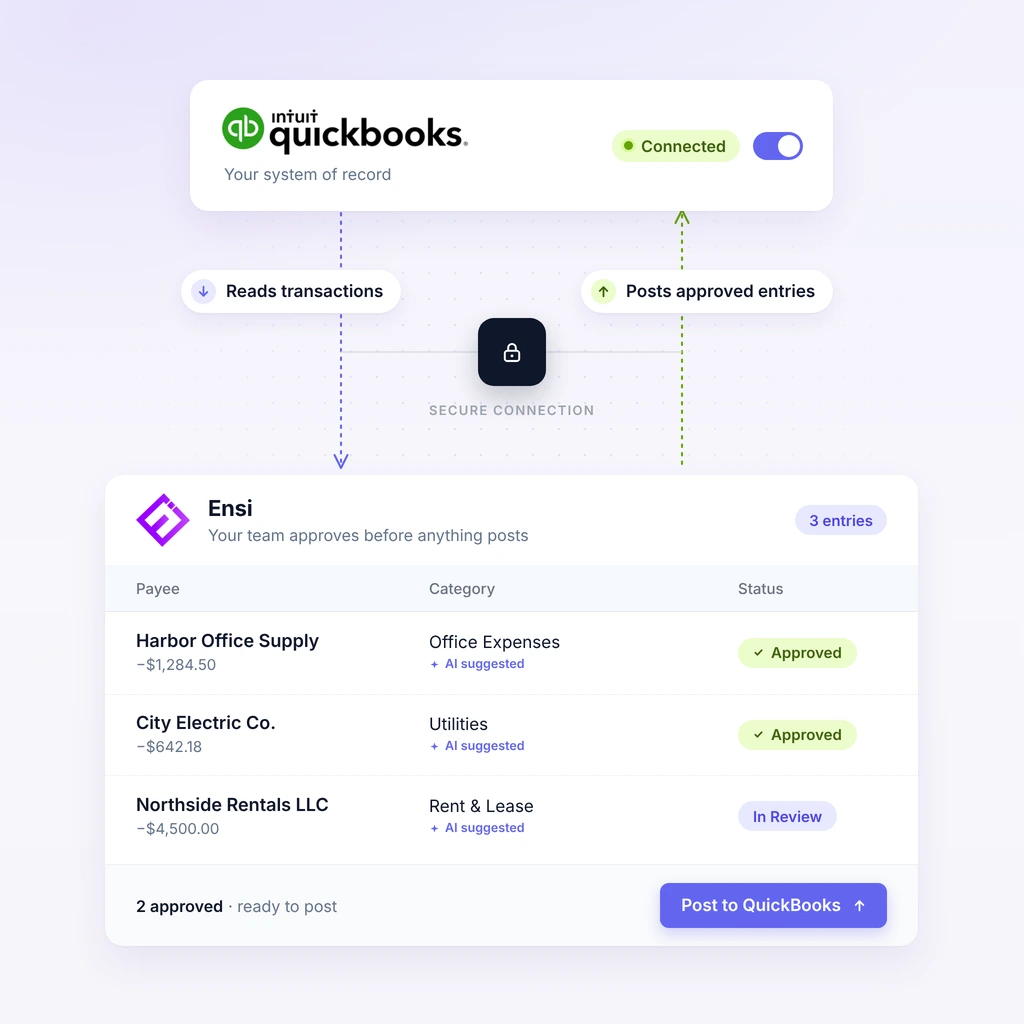
Figure 2. Ensi reads transactions from QuickBooks Online, your team approves, and only approved entries post back.
Many firms use both: QuickBooks AI helps clients between closes, and Ensi gives the firm a reviewed, consistent workflow across the whole client list. For a wider look at the market, see our guide to the best AI accounting software.
Frequently Asked Questions
Does QuickBooks Online have AI?
Yes. QuickBooks Online includes AI agents, grouped under Intuit Intelligence, that help with categorization, reconciliation, invoicing, insights and more. Availability depends on the QuickBooks plan.
What does the QuickBooks Accounting Agent do?
It automates transaction categorization and helps reconcile books. In November 2025, Intuit added expanded anomaly detection and AI reconciliations to it.
Should accountants trust QuickBooks AI output?
Treat it as a starting point. AI can be confidently wrong, and errors can repeat across many transactions, so review what the agents changed before closing a period.
Can QuickBooks post transactions automatically?
Yes. Bank rules can be set to auto-post matching transactions without review, and the Accounting Agent categorizes and matches bank feed transactions for your approval. Firms should know which automations are active for each client.
Do I still need Ensi if my clients have QuickBooks AI?
QuickBooks AI is designed for a single business’s books and varies by plan. Ensi is built for firms: it does the bookkeeping and close prep across every client, and your team approves everything before it posts.
Does Ensi replace QuickBooks Online?
No. Ensi works on top of QuickBooks Online. QBO stays the system of record, and approved entries post back to it.
Is client data secure with Ensi?
Ensi’s founders come from data-security backgrounds, and its SOC 2 audit is underway. Client books stay in QuickBooks Online, and you can revoke Ensi’s access to any client with one click.
See Ensi on Top of QuickBooks Online
Bring a QBO client file to a 30-minute demo and watch Ensi prepare it live, with no slides.