
Automated Bank Reconciliation Software for Accounting Firms
Reconciliations slow down the month-end close. Every bank and credit card account must tie out, and for firms with dozens or hundreds of clients, that means thousands of matches a month. Ensi is automated bank reconciliation software for accounting firms on QuickBooks Online. It does the matching and flags discrepancies, so your team only resolves exceptions and approves.

Works with QuickBooks Online
12 to 4 days
month-end close
80%+
of bank feed transactions categorized automatically
Under 30 min
to connect QuickBooks Online and go live
Definition
What Is Bank Reconciliation Software?
Bank reconciliation software compares the transactions in a company’s books with its bank and credit card statements, matches them, and highlights differences such as missing, duplicated or miscategorized entries. Firm-focused tools do this across many client ledgers and route exceptions to an accountant for review.
AI reconciliation software also learns how each client’s transactions normally look, detects errors, and explains what doesn’t tie out.
The challenge
Why Do Reconciliations Take So Long at Accounting Firms?
Volume
Every account at every client, every month, often due in the same few days.
Messy Inputs
Late statements, missing transactions, duplicates and transfers recorded on only one side.
Upstream Errors
Miscategorized transactions surface as reconciliation problems later.
Manual Investigation
Finding why an account is off usually means scrolling the ledger line by line.
Thin Review Time
Managers can’t re-check every reconciliation, so quality depends on who did the work.
AI is still rarely used here. In Financial Cents’ 2026 survey of bookkeeping and accounting professionals, only 24% of respondents already using AI applied it to bank reconciliation, compared with 75% using it to draft client emails.
How it works
How Ensi Automates Bank Reconciliations
Every client’s reconciliation runs through the same five steps.
1. Fewer Errors Before the Reconciliation Starts
Most reconciliation problems start upstream, in day-to-day bookkeeping. Ensi categorizes 80%+ of bank feed transactions automatically by learning from each client’s history, so fewer errors reach the reconciliation. See automated transaction categorization software.
2. AI-Driven Matching and Error Detection
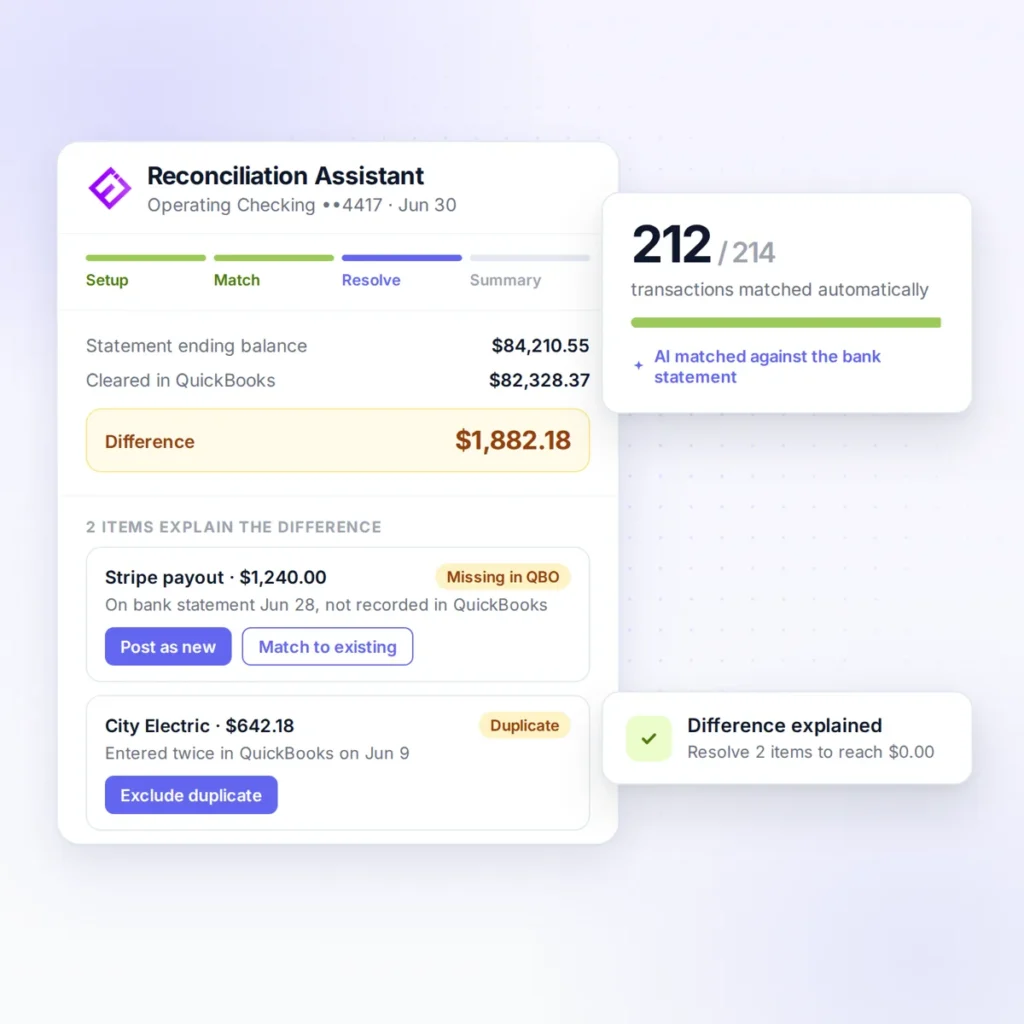
Ensi performs reconciliations quickly and flags what doesn’t tie out, so your team starts with the exceptions instead of a blank worksheet.
3. Missing and Unusual Transactions Flagged
Ensi checks every ledger for anomalies and missing transactions, catching the problems that most often throw a reconciliation off.
4. Transactions Outside the Bank Feed Captured
When transactions don’t come through the bank feed, Ensi extracts the data from bank statements and check images, so nothing has to be keyed in by hand.
5. Your Team Reviews and Posts
Staff approve, edit or reject Ensi’s proposed adjustments. Approved entries post back to QuickBooks Online, which remains the system of record. Every adjustment keeps an audit trail.
Comparison
Manual Reconciliation vs. QuickBooks Matching vs. Ensi
- Who does the work: Staff, line by line
- Finding the cause of differences: Manual search
- Missing transactions: Found if someone looks
- Across many clients: Hours grow with each client
- Where books live: QBO
- Who does the work: Varies by plan
- Finding the cause of differences: Varies by plan
- Missing transactions: Varies by plan
- Across many clients: Built for one business's own books
- Where books live: QBO
- Who does the work: AI prepares; staff review exceptions
- Finding the cause of differences: Discrepancies surfaced and explained
- Missing transactions: Checked on every ledger
- Across many clients: Built for every client ledger
- Where books live: QBO remains the system of record
Checklist
Features to Look For in Bank Reconciliation Software
- Exception-first workflow that shows only what doesn’t tie out
- Error detection for missing, duplicated and miscategorized transactions
- Multi-client design so every client’s reconciliation runs from one workflow
- Document reading for statements and checks outside the bank feed
- Human approval before any adjustment posts
- Native ledger integration with no migration
- Month-to-month terms so you can test it on real client files
Results
What Faster Reconciliations Mean for Your Firm
The gains show up in three places.
A Faster Close
Reconciliations are often the longest step. Ensi cuts the monthly close from 12 days to 4. See month-end close software for accounting firms.
Higher Quality
Every account at every client gets the same scrutiny, not just the ones a manager has time to spot-check.
More Capacity
Time saved on matching goes back into review, advisory work and new clients.
FAQ
Frequently Asked Questions
What is the best bank reconciliation software for accounting firms?
The best bank reconciliation software for accounting firms works across many client ledgers, flags exceptions instead of making staff hunt for them, and keeps an accountant in control of adjustments. Ensi does this for firms on QuickBooks Online, alongside AI categorization, ledger checks and flux analysis.
Can AI reconcile bank accounts?
Yes. AI can match transactions, detect errors and surface discrepancies far faster than manual work. The safest approach is for AI to prepare the reconciliation and an accountant to review exceptions and approve any adjustments.
Does Ensi replace QuickBooks reconciliation?
No. Ensi works on top of QuickBooks Online. It prepares the reconciliation work and flags issues, and approved entries post back to QBO.
What causes most reconciliation differences?
Common causes include missing transactions, duplicates, timing differences, transfers recorded on only one side and miscategorized entries. Ensi checks every ledger for anomalies and missing transactions to catch these early.
Does Ensi work with QuickBooks Online?
Yes. Ensi reads from QuickBooks Online, your team reviews the proposed work, and approved entries post back to QBO. QuickBooks stays the system of record.
How long does it take to get started?
Most firms are live in under 30 minutes. You connect QuickBooks Online, with no migration or rebuild. Pricing is month to month with no minimums or contracts.
Is client data secure with Ensi?
Ensi’s founders come from data-security backgrounds, and its SOC 2 audit is underway. Client books stay in QuickBooks Online, and you can revoke Ensi’s access to any client with one click.
Live demo
Watch Ensi Reconcile a Real Client File
Bring a client file to a 30-minute demo and we’ll run the reconciliation live, with no slides.